


HIGHLIGHTS
- In Oblivion Remastered, players can easily preview a variety of preset hair colors and styles during character creation.
- Players can add highlights, adjust gradient, and contrast to create natural looks to bold and dramatic hair effects.
- Change eyebrow color is also possible in the same panel to match or contrast with your chosen hairstyle.
The Elder Scrolls IV: Oblivion Remastered is an update of Bethesda’s beloved 2006 RPG classic, built on Unreal Engine 5.
When creating a new character in Oblivion Remastered, you can customize your character’s hairstyle and color directly in the character creation menu.
Players can select varieties of hairstyles for both male and female characters and adjust the hair color.
Change Hair For A New Character In Oblivion Remastered
If you want to change hair for a new character in Oblivion Remastered, navigate to the hair tab at the top of the customization menu.
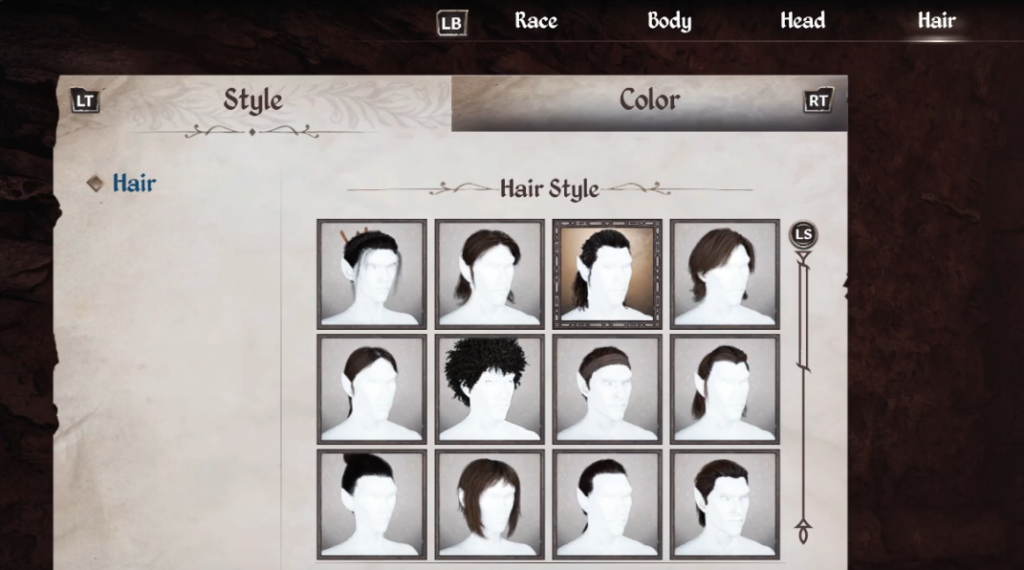
Further, on a controller, press the right trigger (RT) to open the hair color panel. You’ll see a list of preset hair colors, rather than a full color wheel or RGB sliders.
Thus, you can use your controller or keyboard to scroll through these options.
Each color selection will instantly preview on your character to see the effect before confirming your choice.
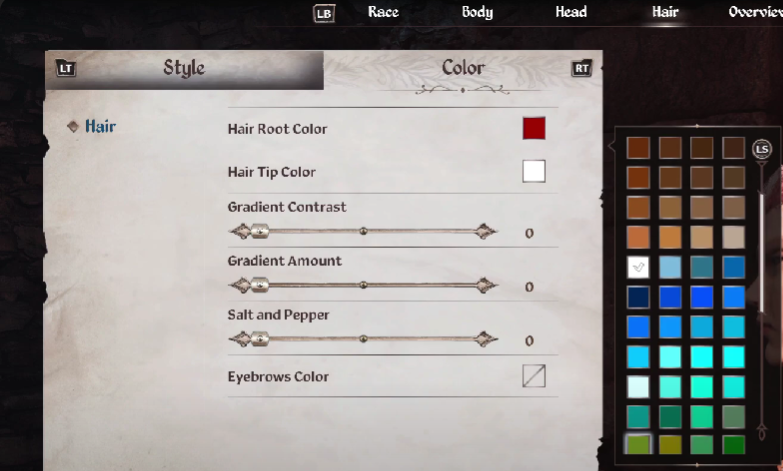
In the same section, you can add highlights for a two-tone or more dynamic appearance.
Moreover, you can adjust the gradient and the contrast to make colors fade smoothly or stay sharp and soft or bold.
Additionally, you can change your eyebrow color here, either to match your hair or create a contrasting style.
Change Hair On An Existing Character (PC Only)
If you want to change hair for an existing character, open the console by pressing the key (~).
Then, type showracemenu and press Enter, it will open the character creation menu again.
This allows you to change your hairstyle and color, as well as other appearance features.
However, if you use console commands, it can disable achievements, and changing your race will reset your level.
After editing, you can use additional console commands (like advlevel) to restore your previous level.

