



HIGHLIGHTS
- After completing a round in DTI, check above the leaderboard during intermission to find a unique sequence of emojis to determine the code order for Flamethrower.
- After redeeming your unique code, a button will appear at the bottom of your screen; click it to equip the Flamethrower.
- The Flamethrower adds dramatic visual effects, such as fiery bursts, making your outfit stand out during fashion rounds
The April Fools’ Day event starts on April 1st at 5 PM GMT and concludes on April 2nd at 5 PM GMT.
Significantly, the Flamethrower is one of the most exciting rewards introduced in Dress to Impress as part of the April Fools’ Day event.
Unlike typical items, to unlock the Flamethrower, players must solve a unique riddle involving emojis and numbers.
Locate The Emoji Sequence For Flamethrower In DTI
After completing a round in DTI, players must check above the leaderboard during the intermission.
Then, they will discover the display of a sequence of emojis representing the order you need to follow for your code.
This sequence is unique for every player and changes each time. For example, your emoji sequence might be:
- Heart
- Star
- Dress
Find Emojis And Their Numbers
Next, players must search for the hidden emojis as they are scattered across the map; however, each emoji is paired with a number.
Further, both of their locations and values are randomized for every player and common locations include:
- On Lina’s table in the salon.
- Inside dressing rooms.
- On a table in the salon area.
- On the roof near the accessories section.
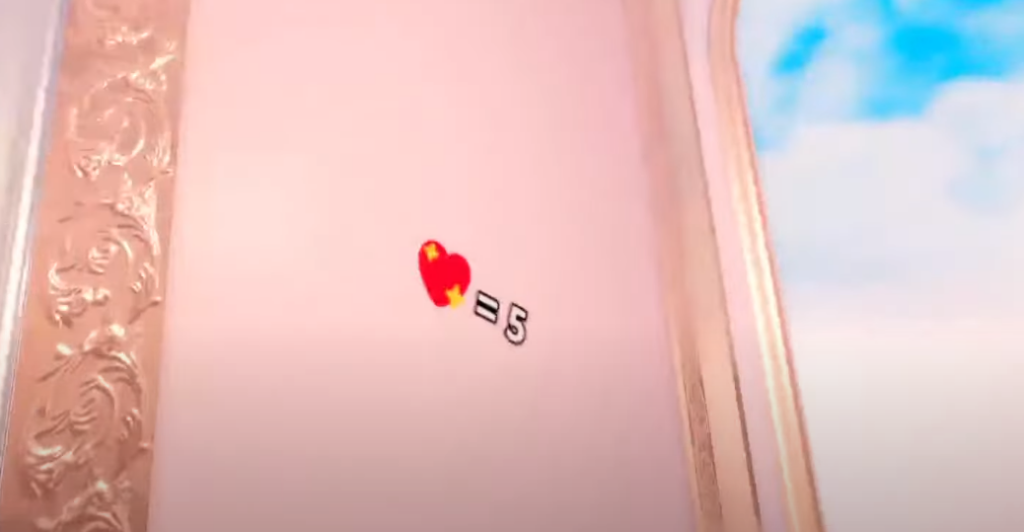
For example:
- The Heart emoji might correspond to 2.
- The Star emoji might correspond to 5.
- The Dress emoji might correspond to 3.
Assemble Your Code
After you finish finding all your emojis and their respective numbers, arrange them in the same order as displayed above the leaderboard.
Nevertheless, you can use the example above:
- Heart (2), Star (5), Dress (3) → Code: 253.

Finally, after redeeming your unique code, a button will appear at the bottom of your screen; click it to equip the Flamethrower.
If you’re playing on a computer, press the left mouse button to activate the Flamethrower and set the runway ablaze.

