



HIGHLIGHTS
- In Schedule 1, visit the Warehouse District after 6 PM, talk to Manny inside the building with vendors, and pay $200/day plus a signing fee to hire the Handler.
- Equip the management clipboard (press ‘9’), assign the Handler a bed, and designate up to three packaging stations for them to manage.
- To transfer items, you must create routes for the Handler between storage racks, packaging stations, and output racks to streamline operations.
Schedule 1 is an early access simulation game where players build and manage a drug empire within the fictional city of Hyland Point.
One employee in this game is the Handler, who helps with the movement of products within your operation.
Further, it helps players transport items between various stations, such as moving products from storage racks to packaging stations and then to output racks.
Hiring A Handler In Schedule 1
To hire a Handler in Schdeule 1, you need to visit the Warehouse District near Taco Tickler after 6 PM.
Then, enter the building with vendors inside, go upstairs, and speak to Manny.
Further, select “I want to hire employees” and choose the Handler option, which costs $200 per day plus a signing fee.
Assigning Tasks To The Handler
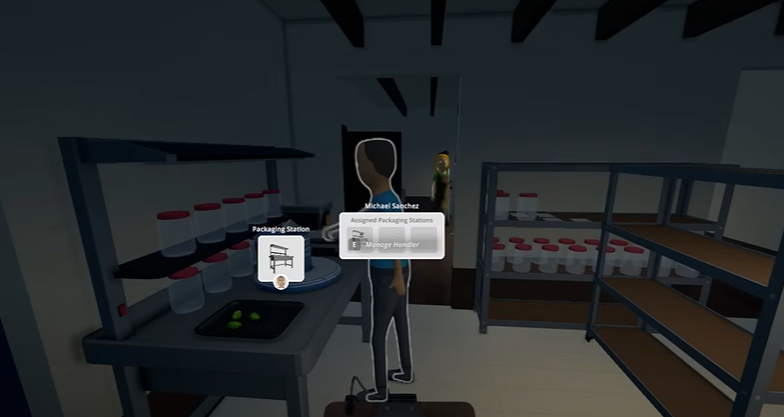
After hiring, go to the property where the Handler will work and equip the management clipboard (press ‘9‘).
Look at the Handler and press ‘E‘ to open their assignment menu; assign the Handler a bed for resting.
Further, assign up to three packaging stations for them to manage.

Set Routes
Set routes from storage racks to packaging stations and, optionally, from packaging stations to output racks.
For the Route 1, you must choose the starting point on the storage rack with products and then proceed to select the destination at the packaging station.
For Route 2, the order entry system requires the selection of the packaging station as the “From” location and the empty storage rack as the “To” location.
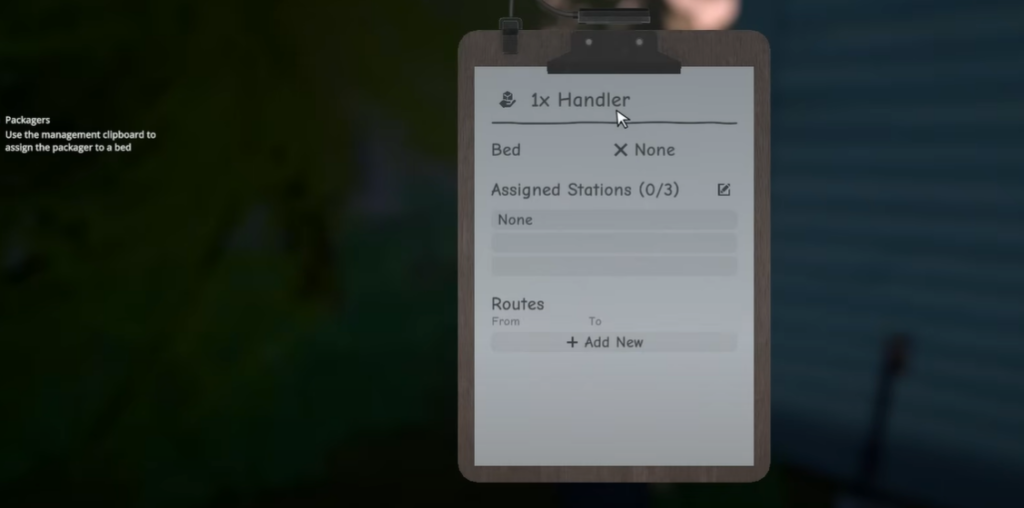
Now, the Handler will automatically move items from the product shelf to the packaging station, then transfer packaged goods to the empty storage rack.
You should also ensure the Handler is paid daily by placing cash in the briefcase at the foot of their bed.
Moreover, you must deposit enough funds for several days to minimize daily micromanagement.

